Page 1 of 1
2 entries next to each other
Posted: Sun Feb 04, 2007 11:07 pm
by tazilein
Are there any s9y-themes where you have 2 entries in a row ?
I am planning a small plattform for articles and would like to use small teasers. To have better optics it would be nice to have that teaser only about 250 px width and 2 teasers in a row.
Exists any s9y-theme with that feature ?
Re: 2 entries next to each other
Posted: Mon Feb 05, 2007 1:01 am
by yellowled
tazilein wrote:Are there any s9y-themes where you have 2 entries in a row ?
I'm not sure if it is exactly what you're looking for, but you might want to check out Carl's Hemingway port.
YL
Posted: Mon Feb 05, 2007 3:19 pm
by tazilein
Hello YL !
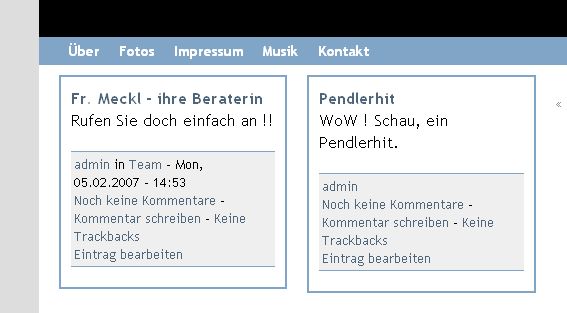
I checked the Hemingway-Port and thats nearly what I want. I now edited your YL 1.5 template a little bit and it seems to work fine at the first look:
http://666kb.com/i/alkrw7ll8p7ywhubm.jpg
The only thing I would need: I need that special setting (= 2 columns for entries) only for the overview of a category. If I click on an entry I need the full width for it again.
I found a plugin to give a category another theme, so I could copy the template, make the adaptions and use it for that category. If there is a better way, I would be happy

UPDATE: It seems that the class .serendipity_entry_body_folded could do the job, but I only found few informations:
http://www.s9y.org/122.html &
http://www.s9y.org/122.html
I would need a code example of a tpl-file where this class is used. Does any theme use it ?
Posted: Tue Feb 06, 2007 12:52 am
by yellowled
tazilein wrote:The only thing I would need
I'm very sorry, I don't understand what you're looking for. Maybe this is a language issue - could you re-post your questions in the German forum, please? (Might also be because I'm friggin' tired at the moment

)
YL
Posted: Tue Feb 06, 2007 11:42 am
by yellowled
Okay, tazilein has PMed me in German, and now I understand what he wants to do: Basically, we "only" need to assign (at least that's my idea for a solution) an additional class to <div class="serendipity_Entry_Date"> in the entries.tpl in case the page displayed is the category view of a certain category.
In "baby smarty" this would be: "if page is category view for category xy, assign class z to every <div class="serendipity_Entry_Page">".
I know how to do this assignment, but I have zero idea how to find out if the page is a category view ... anybody else?
YL
Posted: Tue Feb 06, 2007 10:46 pm
by tazilein
Hello YellowLed again !
In my head I work on a solution, but with NO smarty/php - knowledge the head hurts without a result

.
In the YL 1.5 in the entries.tpl you use on line 34
I added
Code: Select all
<div class="{if $entry.is_extended}serendipity_entry_body_folded{/if}
instead of
Code: Select all
<div class="serendipity_entry_body_folded
on line 8.
Now in the main view and the category view a post uses the full width. when he is extended he uses just the small width of 40%. I just want it the other way round and I am happy. If I use $entry.is_folded instead of $entry.is_extended the small styling is never used. So I assume that $entry.is_folded does not exist / has another name.
EDIT: On
http://www.mediablog.at/vivendi/ I have a testblog
Posted: Wed Feb 07, 2007 11:36 am
by yellowled
tazilein wrote:So I assume that $entry.is_folded does not exist / has another name.
Moreover, both variables are used for a complete different purpose! I'm not sure at the moment whether s9y needs an event plugin or can do this out of the box, but you can have the so-called extended entries, which have only a teaser on the index page and a longer text once you get to the detailed article view.
It's probably not a good idea to use those for your purpose.
YL