Page 1 of 1
modifying serendipity_event_entrylastmodified
Posted: Fri Oct 01, 2010 11:25 pm
by search1
Hi,
I need the plugin serendipity_event_entrylastmodified for my CMS, that I use with s9y.
But the style is not good. I want the output like "Zuletzt bearbeitet am 17.09.2010 23:59" in the same line and style as: "Verfasser: XY • 17.09.2010" under each entry. The name of the last modifier should also be shown.
I suppose, I have to change something in the plugins/serendipity_event_entrylastmodified/serendipity_event_entrylastmodified.php and in the templates/my template/entries.tpl in the line:
Code: Select all
<p class="meta">Verfasser: {$entry.author} • {$entry.timestamp|@formatTime:'%d.%m.%Y'}{if $entry.has_comments}{if $view != 'entry'} • <a href="{$entry.link}#comments">{$entry.comments} {$entry.label_comments}</a>{/if}{/if}</p>
?
Re: modifying serendipity_event_entrylastmodified
Posted: Sat Oct 02, 2010 11:31 pm
by garvinhicking
Hi!
Hm, that's harder to achieve. You need to place the $entry.add_footer variable near the "meta" class. But also other plugins add their output in that class, so you might need to do some adjusting there.
We could also modify the plugin to have its own smarty variable and might need some coding for that, though. I just modified the plugin to version 1.7 and added the smarty variable {$entry.last_modified} that you can put to your entry. The plugin STILL emits its outout also to $entry.add_footer, so you might need CSS to hide the second output, like ".footer .entry_last_modified { display: none}" to hide the second occurence.
The name of the last modifier should also be shown.
Serendipity and the plugin do not store that, only the creator of an entry is logged.
HTH,
GArvin
Re: modifying serendipity_event_entrylastmodified
Posted: Sun Oct 03, 2010 12:45 am
by search1
Hi,
thank you very much for updating the plugin! It isn´t shown in SPARTACUS in my S9Y as a new version, but I copied the new file serendipity_event_entrylastmodified.php from sourceforge and put it in my test-version.
Now under every entry it was shown twice: "Zuletzt bearbeitet am ..."
Then I added the variable {$entry.last_modified} in templates/my template/entries.tpl:
Code: Select all
<p class="meta">Verfasser: {$entry.author} • {$entry.timestamp|@formatTime:'%d.%m.%Y'} • {$entry.last_modified}{if $entry.has_comments}{if $view != 'entry'} • <a href="{$entry.link}#comments">{$entry.comments} {$entry.label_comments}</a>{/if}{/if}</p>
This produced the following output:
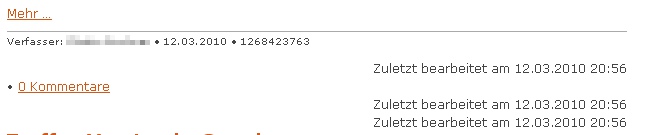
- footer.jpg (20.8 KiB) Viewed 5110 times
The style is not correct of the first "last modified". I suppose, it should be <p class="meta">, but is <div class="entry_last_modified" ? Also a strange number is shown.
And where can i add the css-code:
Code: Select all
.footer .entry_last_modified { display: none}
?
In serendipity_event_entrylastmodified.php, entries.tpl of my template or a ?.css of my template?
Thanks for your great work!
Re: modifying serendipity_event_entrylastmodified
Posted: Mon Oct 04, 2010 10:52 am
by garvinhicking
Hi!
There was a bug in the earlier revision, check out the plugin again.
And where can i add the css-code:
Code: Select all
.footer .entry_last_modified { display: none}
?
In serendipity_event_entrylastmodified.php, entries.tpl of my template or a ?.css of my template?
In your template's style.css sheet. You might need to replace ".footer" with the propper CSS class that encapsulates the double occurence of entry_last_modified that you want to remove.
Regards,
Garvin
Re: modifying serendipity_event_entrylastmodified
Posted: Thu Oct 07, 2010 12:24 am
by search1
Hi Garvin,
thanks for your great work!
I installed the new version of the plugin; same thing: I want a different style in the same line and style as: "Verfasser: XY • 17.09.2010" under each entry.
Then I put the new variable {$entry.last_modified} in the entries.tpl of my template and the last modifier appiers twice:

- footer1.jpg (17.75 KiB) Viewed 5089 times
Then I wrote in the style.css of my template:
Code: Select all
.entry_last_modified { display: none}
and it appears:
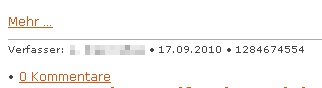
- footer2.jpg (8.57 KiB) Viewed 5089 times
(.footer .entry_last_modified { display: none} makes no difference to the first picture in this comment)
How can I change the strange number to the right output? And how can I change the style of the shown comments?
Thanks!
Re: modifying serendipity_event_entrylastmodified
Posted: Thu Oct 07, 2010 10:51 am
by garvinhicking
Hi!
I forgot that $entry.last_modified was there already, and the plugin unproperly appended it.
If you display it yourself, you actually can simply remove the entrylastmodified plugin and place {$entry.last_modified|@date_format:...} at the place you want it. You can look up the variables needed for formatting the timestamp on smarty.net/date_format.
(I also updated the plugin to 1.9 now and the string variable with the html markup is now $entry.string_last_modified} - if you place that, you still need to adjust your CSS to properly remove the output inside the footer without removing your manual output. Your current CSS would remove ALL instances of a last modifier output string)
HTH,
Garvin
Re: modifying serendipity_event_entrylastmodified
Posted: Thu Oct 07, 2010 11:39 am
by search1
Hi Garvin,
everything works fine, thank you:
I wrote the {$entry.last_modified|@date_format:...} in the entries.tpl of my template:
Code: Select all
<p class="meta">{$entry.author} • {$entry.timestamp|@formatTime:'%d.%m.%Y %H:%M'} • {$entry.last_modified|@date_format:'zuletzt geändert von einem Autor am %d.%m.%Y %H:%M'} {if $entry.has_comments}{if $view != 'entry'} • <a href="{$entry.link}#comments">{$entry.comments} {$entry.label_comments}</a>{/if}{/if}</p>
and it worked:
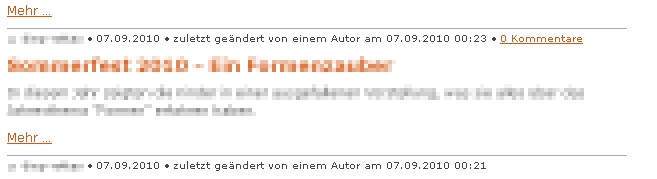
- footer3.jpg (28.75 KiB) Viewed 5080 times
But now, it woud be perfect to show the last modified time only, if there was a modifying (but the comments also, if there are some, also if there is no modifying of the entry.
Here my try, that didn´t work:
Code: Select all
<p class="meta">{$entry.author} • {$entry.timestamp|@formatTime:'%d.%m.%Y %H:%M'} {{if $entry.timestamp|@formatTime != $entry.last_modified|@date_format}{ • {$entry.last_modified|@date_format:'zuletzt geändert von einem Autor am %d.%m.%Y %H:%M'}} {if $entry.has_comments}{if $view != 'entry'} • <a href="{$entry.link}#comments">{$entry.comments} {$entry.label_comments}</a>{/if}{/if}</p>
In the plugin is a $format_string_nomod; no idea, if this can help?
Re: modifying serendipity_event_entrylastmodified
Posted: Thu Oct 07, 2010 3:45 pm
by garvinhicking
Hi!
You could do a comparison if {$entry.last_modifed != $entry.timestamp} so that you only show the code if those differ.
Regards,
Garvin
Re: modifying serendipity_event_entrylastmodified
Posted: Thu Oct 07, 2010 4:38 pm
by search1
Thanks for the answer.
Something dosn´t work yet:
The modifying is always shown, also if there is no modifying:
Code: Select all
<p class="meta">{$entry.author} • {$entry.timestamp|@formatTime:'%d.%m.%Y %H:%M'} {if $entry.last_modifed != $entry.timestamp} • {$entry.last_modified|@date_format:'zuletzt geändert von einem Autor am %d.%m.%Y %H:%M'}{/if} {if $entry.has_comments}{if $view != 'entry'} • <a href="{$entry.link}#comments">{$entry.comments} {$entry.label_comments}</a>{/if}{/if}</p>
What is wrong?
Thank you very much!
Re: modifying serendipity_event_entrylastmodified
Posted: Fri Oct 08, 2010 11:58 am
by garvinhicking
Hi!
Your spelling: "last_modifed"

Regards,
Garvin
Re: modifying serendipity_event_entrylastmodified
Posted: Fri Oct 08, 2010 4:20 pm
by search1
Thank you! Everything works perfekt! Great help.