Page 1 of 1
Remove several images from media database at once
Posted: Sun Feb 28, 2010 7:08 pm
by basquiat
Dear all,
as I have quite a bunch of pictures which I want to remove from my s9y media database, I wonder if there's some plugin/interface/trick that allows me to select multiple items for deletion. The current way of clicking, approving and being thrown back to the first database page afterwards is not suitable for such a task.
Best regards,
Jens
Re: Remove several images from media database at once
Posted: Mon Mar 01, 2010 2:00 am
by Don Chambers
Do you have FTP access? If so, you can delete them from your media folder (usually /uploads/).
Re: Remove several images from media database at once
Posted: Mon Mar 01, 2010 7:51 am
by basquiat
Hi DonChambers,
deleting from the filesystem itself is no problem (full SSH access to the server), but doesn't s9y also store (meta)information about the uploads in the SQL database? If so, does it clean up the data automatically after deletion (or is there some way to trigger it without manually purging any entries)?
Thank you and best regards,
Jens
Re: Remove several images from media database at once
Posted: Mon Mar 01, 2010 12:56 pm
by garvinhicking
Hi!
Sadly currently there really is no "multi-deletion" interface. s9y actually keeps the metadata (for safety reasons, because often especially after server moves people resync their thumbnails and might loose the DB-contents).
I could write up a simple script that deletes all metadata inside the s9y table that refers to missing files, would that be a solution to your current issue?
Regards,
Garvin
Re: Remove several images from media database at once
Posted: Mon Mar 01, 2010 3:19 pm
by Don Chambers
Forgot about the media table. I think a utility to delete media table items that correspond to missing file system items would be good.
Garvin - would media table info be recreated for thumbnails if thumbnails (not larger images) had been deleted, then admin regenerated thumbs?
Re: Remove several images from media database at once
Posted: Mon Mar 01, 2010 6:42 pm
by basquiat
Hi Garvin!
garvinhicking wrote:I could write up a simple script that deletes all metadata inside the s9y table that refers to missing files, would that be a solution to your current issue?
Yes, that would at least easen my problem quite some bit and would (as Don already pointed out) generally be a good thing to have, maybe integrated into the admin interface one day?
Thank you and best regards,
Jens
Re: Remove several images from media database at once
Posted: Tue Mar 02, 2010 2:22 pm
by garvinhicking
Hi!
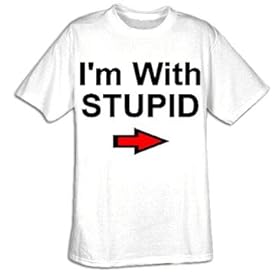
Argl. I'm with stupid. I just went about to add this to the core and was halfway through, when I found out Serendipity in fact already DOES delete image references in the database, when a file is no longer existing.

So, go ahead and delete your files, and then simply use the "sync thumbnailS" option in the s9y admin interface. You might want to to a full backup of the filesystem and database prior to this.

Regards,
Garvin
Re: Remove several images from media database at once
Posted: Tue Mar 02, 2010 3:06 pm
by Don Chambers
Re: Remove several images from media database at once
Posted: Tue Mar 02, 2010 7:23 pm
by basquiat
garvinhicking wrote:I just went about to add this to the core and was halfway through, when I found out Serendipity in fact already DOES delete image references in the database, when a file is no longer existing.
Glad to see s9y has even so far evolved that it's core developers can't keep up.
As I followed your suggested steps, I now have a "legacy free" media database again.
Thanks to both of you, Garvin and Don, for the time you took on this!
Best regards,
Jens
Re: Remove several images from media database at once
Posted: Tue Mar 02, 2010 7:47 pm
by Don Chambers
Re: Remove several images from media database at once
Posted: Wed Mar 03, 2010 11:21 am
by garvinhicking
Hi Don!
Great shirt, but I believe it needs the arrow pointing upwards.
Regards,
Garvin
Re: Remove several images from media database at once
Posted: Wed Mar 03, 2010 5:43 pm
by Don Chambers
garvinhicking wrote:Hi Don!
Great shirt, but I believe it needs the arrow pointing upwards.
Regards,
Garvin
Good point!