Page 3 of 4
Posted: Tue May 03, 2005 7:35 pm
by Operator
Problem1 (concerning SAVE button):
This is the output:
Array ( [serendipity] => Array ( [project_to_repercent] => Array ( [4] => 5 [2] => 0 [1] => 10 [3] => 0 ) [project_to_recat] => Array ( [4] => 0 [2] => 0 [1] => 0 [3] => 0 ) [project_to_reassign] => Array ( [4] => 0 [2] => 0 [1] => 1 [3] => 0 ) [project_to_recolor] => Array ( [4] => 4 [2] => 6 [1] => 2 [3] => 7 ) ) [SAVE] => Save )
Problem2(images not loading): It's really the webserver that needs a restart. After "Contacting localhost" there is no answer and if I try to open another page on the webserver it just says "Contacting localhost"...
Chaning the output to static works just fine, images are all shown. (But not so pretty of course

)
Operator
Posted: Tue May 03, 2005 8:04 pm
by cottonwood
Operator wrote:Problem1 (concerning SAVE button):
This is the output:
Array ( [serendipity] => Array ( [project_to_repercent] => Array ( [4] => 5 [2] => 0 [1] => 10 [3] => 0 ) [project_to_recat] => Array ( [4] => 0 [2] => 0 [1] => 0 [3] => 0 ) [project_to_reassign] => Array ( [4] => 0 [2] => 0 [1] => 1 [3] => 0 ) [project_to_recolor] => Array ( [4] => 4 [2] => 6 [1] => 2 [3] => 7 ) ) [SAVE] => Save )
Problem 1 is getting annoying.

That data all looks fine to me. Do you get the same problems when managing colors as well? Can you post a list of the errors that you get when pressing the SAVE button. Can you also confirm for me whether or not the changes you make actually get saved or not after clicking on the SAVE button?
Operator wrote:
Problem2(images not loading): It's really the webserver that needs a restart. After "Contacting localhost" there is no answer and if I try to open another page on the webserver it just says "Contacting localhost"...
Chaning the output to static works just fine, images are all shown. (But not so pretty of course
)
The not so pretty part is part of my original bug. I've been ignoring the static images for a while now, and have introduced some other features that have broken them. In particular, you can set the bar length to arbitrary values, so the static images are getting stretched or shrunk. That'll be fixed in my next commit. Setting the bar length to 101 in the todolist plugin configuration should make them look better.
Now, more debugging. Are there any files in your SERENDIPITYROOT/templates_c directory that look like:
Code: Select all
cache_todolist_progressimage-100_101_18_ffc4f6_ff7ded_0_8_huxtable.ttf_.png
If so, what size are those files? And, if they are not zero sized files, can you upload them somewhere that I can see them?
Usual problems etc.
Posted: Tue May 03, 2005 8:22 pm
by Operator
Problem1:
- Yep, problem one shows up when adding colors aswell.
Array ( [serendipity] => Array ( [color_to_rename] => Array ( [9] => Test [1] => Blue [2] => Gold [3] => Green [4] => Orange [5] => Purple [6] => Red [7] => Silver ) [color_to_recolor1] => Array ( [9] => ff3333 [1] => ccccff [2] => ffffcc [3] => aaffaa [4] => ffeecc [5] => ffddff [6] => ffdddd [7] => eeeeee ) [color_to_recolor2] => Array ( [9] => ff3333 [1] => 3333bb [2] => 666633 [3] => 336633 [4] => ff8811 [5] => 550066 [6] => dd4444 [7] => 999999 ) ) [SAVE] => Save )
Warning: Invalid argument supplied for foreach() in C:\xampplite\htdocs\blogs\serendipity\plugins\serendipity_event_todolist\serendipity_event_todolist.php on line 370
Warning: Invalid argument supplied for foreach() in C:\xampplite\htdocs\blogs\serendipity\plugins\serendipity_event_todolist\serendipity_event_todolist.php on line 374
Warning: Invalid argument supplied for foreach() in C:\xampplite\htdocs\blogs\serendipity\plugins\serendipity_event_todolist\serendipity_event_todolist.php on line 386
Warning: Invalid argument supplied for foreach() in C:\xampplite\htdocs\blogs\serendipity\plugins\serendipity_event_todolist\serendipity_event_todolist.php on line 394
Warning: Invalid argument supplied for foreach() in C:\xampplite\htdocs\blogs\serendipity\plugins\serendipity_event_todolist\serendipity_event_todolist.php on line 397
Warning: Invalid argument supplied for foreach() in C:\xampplite\htdocs\blogs\serendipity\plugins\serendipity_event_todolist\serendipity_event_todolist.php on line 400
-Problem 1 has always the same error message (see above)
-Changes get saved nevertheless
Problem2:
-Is it normal that static images are all blue?
-Set length temporarily to 101, looks better
-No, no cache.... file in the templates_c directory, only some default... kubrick... and mt3.....
Hope that info helps a bit

Operator
Re: Usual problems etc.
Posted: Tue May 03, 2005 9:05 pm
by garvinhicking
Operator: I will install PHP5+Apache2 on my machine and try to investigate this $_POST error problem. I hope I can get it reproduced
Regards,
Garvin
Posted: Tue May 03, 2005 9:10 pm
by Operator
Thx a lot man

If you wanna have it the quick and easy way, take this package:
http://www.apachefriends.org/de/xampp-windows.html#631
Extract it and your are ready to go. In addition, it's exactly the same environment I use
Operator
Posted: Wed May 04, 2005 12:38 am
by garvinhicking
I could reproduce the problem and just committed version 1.2 of the plugin where this error should happen no more. I also committed several other minor fixes and I hope I didn't break anything that worked before
Regards,
Garvin
PROJECT / TO DO LIST
Posted: Wed May 04, 2005 6:01 am
by rahul
Thanks CottonWood.
The length of that string depends on how many projects i added and how many projects i checked. If i have 1 project, it displays like this:
Array ( [serendipity] => Array ( [project_to_remove] => Array ( [0] => 2 ) [project_to_repercent] => Array ( [2] => 12 ) [project_to_recat] => Array ( [2] => 3 ) [project_to_reassign] => Array ( [2] => 9 ) [project_to_recolor] => Array ( [2] => 4 ) ) [SAVE] => Save )
Warning: Invalid argument supplied for foreach() in D:\Apache Group\Apache2\htdocs\serendipitydemo\plugins\serendipity_event_todolist\serendipity_event_todolist.php on line 379
Warning: Invalid argument supplied for foreach() in D:\Apache Group\Apache2\htdocs\serendipitydemo\plugins\serendipity_event_todolist\serendipity_event_todolist.php on line 382
Warning: Invalid argument supplied for foreach() in D:\Apache Group\Apache2\htdocs\serendipitydemo\plugins\serendipity_event_todolist\serendipity_event_todolist.php on line 385
Warning: Invalid argument supplied for foreach() in D:\Apache Group\Apache2\htdocs\serendipitydemo\plugins\serendipity_event_todolist\serendipity_event_todolist.php on line 402
Also, in the categories page, if i dont check any categories:
Array ( [serendipity] => Array ( [category_to_recolor] => Array ( [4] => 5 [3] => 2 ) ) [SAVE] => Save )
And if i check all categories (i have added 2 categories) and then press save button:
Array ( [serendipity] => Array ( [category_to_remove] => Array ( [0] => 4 [1] => 3 ) [category_to_recolor] => Array ( [4] => 5 [3] => 2 ) ) [SAVE] => Save )
May be this is of some help for u to solve the problem.
Re: PROJECT / TO DO LIST
Posted: Wed May 04, 2005 7:40 pm
by cottonwood
Version 1.17 (CVS revision 1.15) of the todolist plugin has been committed to CVS now. This version should fix the "SAVE" button problems. If you want this version right away, you can get it from:
http://knitwit.cmsd.bc.ca/serendipity_e ... .17.tar.gz
I still haven't resolved the dynamic font generation problem. I'm going to try installing XAMPP on a machine here today and try it out. In the meantime, you can edit the plugin and change the check_gd() function to always return false so that you can see the plain-jane static blue progress graphics.
XAMPP-LITE
Posted: Wed May 04, 2005 8:26 pm
by cottonwood
I installed XAMPP-LITE on a Windows 98 machine and the graphics were generated properly using the 1.17 todolist plugin. Operator and rahul: Are you guys still having problems with the graphics?
Bugs fixed
Posted: Thu May 05, 2005 2:27 am
by Operator
Hey man, nice work. Save buttons works perfectly now.
Regarding those dynamic images: Is it normal that the current version only displays the static ones? (I checked the line you provided earlier but it says: if (function_exists('imagettftext') && function_exists('imagepng')) {....... -->Shouldn't this generate them dynamically?)
Keep up the great job, thx a lot

Greetings
Operator
Damn it, my fault
Posted: Thu May 05, 2005 2:34 am
by Operator
I take everything back what I said about dynamic images. I just had a "static color" set as default
Oh man, I should register so I can edit my posts. Don't want to spam around here

Operator
PROJECT / TO DO LIST
Posted: Thu May 05, 2005 6:36 am
by rahul
Nice Work !!
Save button is working absolutely fine !!
Thanks for solving the problem........
But there's a small fix required in it still...
Whatever color we select and save, no doubt its saved in the database and is displayed in the same color.
But that color is not reflected in the Drop Down box.
I mean colors are always displayed as "Default" whatever we select.
But in database, its stored and the projects are displayed in the same color that we select.
Just a small problem in displating (in interface)
Please let me know where should i perform the change so that i gets displayed.
For your reference, here is the screen shot :
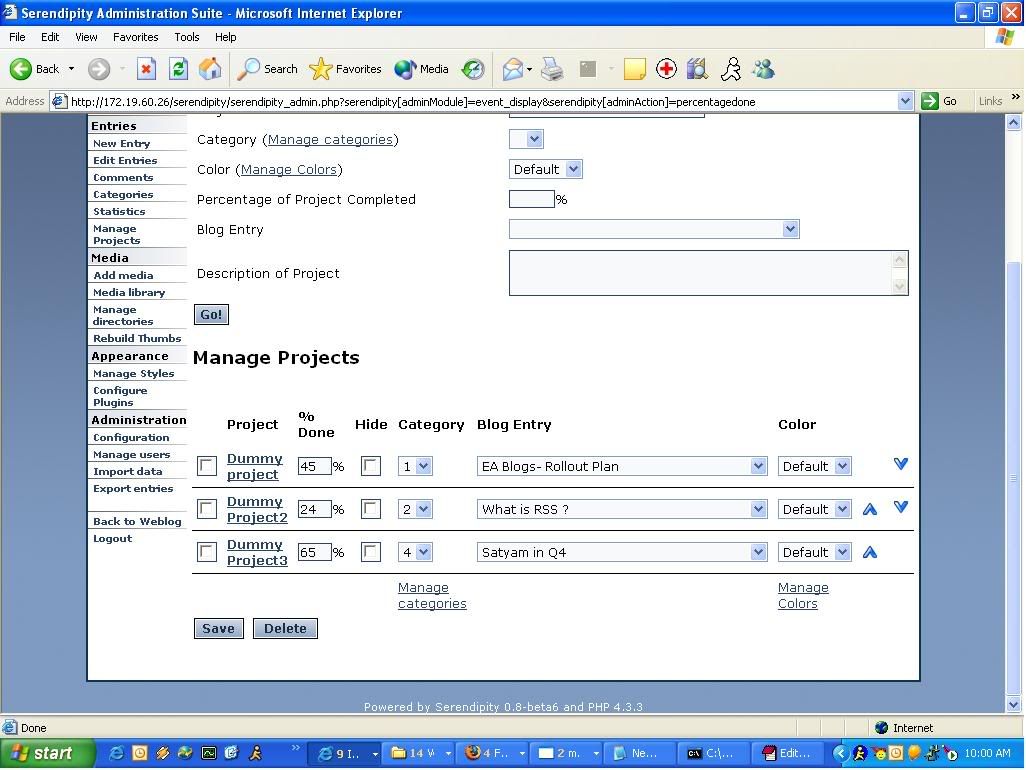 http://img.photobucket.com/albums/v670/ ... tegory.jpg
 http://img.photobucket.com/albums/v670/ ... roject.jpg
Regards,
Rahul
color dropdown box problem
Posted: Thu May 05, 2005 7:29 am
by cottonwood
Rahul:
Can you post the HTML from one of those pages for me?
I'll check this on my XAMPP-LITE installation tomorrow.
Steve.
PROJECT / TO DO LIST
Posted: Thu May 05, 2005 11:25 am
by rahulmunjal
I solved the problem...

It seems i'm improving....

Actually, there was a small fix. Just a misplacement of a double quote due to which the colortext string was not storing the right thing that it should contain.
Just replacing line number 1677, 1795 and 2008 from:
Code: Select all
$colortext.= '<option value="' . $color['colorid'] . ' selected="selected">' . $color['color_name'] . "</option>\n";
to this:
Code: Select all
$colortext.= '<option value="' . $color['colorid'] . '" selected="selected">' . $color['color_name'] . '</option>\n';
solves the problem and it displays the color now !
But there are 1-2 more small problem with Manage Color :
1. When clicking on Color Wheel, it flashes an error in new window:
Couldn't find 'wheel.html' html file.
please provide me that file too.
2. There's a Sample Column which shows No Images.
Please help me in these issues too.
Regards,
Rahul
Re: PROJECT / TO DO LIST
Posted: Thu May 05, 2005 5:14 pm
by cottonwood
rahulmunjal wrote:I solved the problem...
Actually, there was a small fix. Just a misplacement of a double quote due to which the colortext string was not storing the right thing that it should contain.
Thanks for finding that. I need to do more testing with Internet Explorer. That bug didn't show up in Firefox.
rahulmunjal wrote:
1. When clicking on Color Wheel, it flashes an error in new window:
Couldn't find 'wheel.html' html file.
Do you have the wheel.html file in plugins/serendipity_event_todolist/wheel subdirectory? Do you even have the wheel subdirectory? It should contain wheel.html and hsvwheel.png, and they should have been in the 1.17 tarball that I posted earlier, as well as in the CVS repository on SourceForge. I also just noticed that the color wheel does not appear to be working in Internet Explorer.

rahulmunjal wrote:
2. There's a Sample Column which shows No Images.
And yet, the progress bars are showing up properly on your main blog page? Are they generating in different colors on your main blog page? The html <img src=...> tag for these sample images is supposed to be the same as the ones on the main blog. Can you look at the source and see if anything looks strange? Note that these ones should have "nocache" in the URL, but otherwise they should be the same. You'll also need to make some small change to the plugin configuration (like making them 1 pixel longer, or a different color) so that the images on the main page show up using the dynamic generation URL instead of the static image URL the next time they load.