Page 2 of 4
Re: comment notifications died
Posted: Wed May 21, 2025 1:08 am
by DavidC
Code: Select all
$from = "emailtest@imperfectchristians.net";
$to = "admin@imperfectchristians.net";
Re: comment notifications died
Posted: Thu May 22, 2025 4:07 am
by DavidC
As noted in the New User thread, I tried to subscribe a new user, no email was received to approve.
However, I tried to make a Comment from that same computer and, despite the user not being approved - I received a 17-line email.
It appears to be directed to the 'sender' (in this case my wife) - and it informed her that her comment would need to be approved, etc.
Oddly, this email was delivered to my personal email (same domain as hers) - rather than to
admin@imperfectchristians.net
Is there some place in the Serendipity setup that my personal email might reside and for some reason (for Comments, but not for New User subscribe) it chooses to use that one - and for the wrong purpose?
Re: comment notifications died
Posted: Thu May 22, 2025 7:27 am
by onli
Yes, there are the personal settings, accessible at the top, that has an email for each author. That would be a clear bug though, and explain why the plugin does not work for you!
Re: comment notifications died
Posted: Thu May 22, 2025 3:52 pm
by onli
So, I tested this in my dev blog. For me, there was a database error after the user registration - which would explain why no email was sent out for you. I fixed that in
https://github.com/s9y/additional_plugins/pull/195 - tomorrow the new versions should be available as plugin updates. Could you install those then and try again? :)
Re: comment notifications died
Posted: Thu May 22, 2025 9:48 pm
by DavidC
Awesome, will do.
Thanks!
Re: comment notifications died
Posted: Fri May 23, 2025 7:28 pm
by DavidC
Just ran the Update and tried a new User subscription.
No Admin approval email was received at
admin@imperfectchristians.net
Also, if the new User subscription email was supposed to receive an email notifying of pending Admin review for approval - that didn't arrive, either.
Re: comment notifications died
Posted: Fri May 23, 2025 7:43 pm
by onli
Did you get the page after the registration explaining that an email will arrive?
Re: comment notifications died
Posted: Fri May 23, 2025 8:11 pm
by DavidC
onli wrote: Fri May 23, 2025 7:43 pm
Did you get the page after the registration explaining that an email will arrive?
As an email or as a pop-up page on the blog page?
I saw neither.
Re: comment notifications died
Posted: Fri May 23, 2025 10:15 pm
by onli
On the blog page. When you register the user, there is supposed to appear a confirmation page.
So I had a try at your page.
https://www.imperfectchristians.net/ind ... e]=adduser is the dedicated registration page. When I enter my email there, I get the error message "You did not pass the anti-spam tests. Please check if you entered the CAPTCHA correctly." But there is no captcha - which has to be a bug.
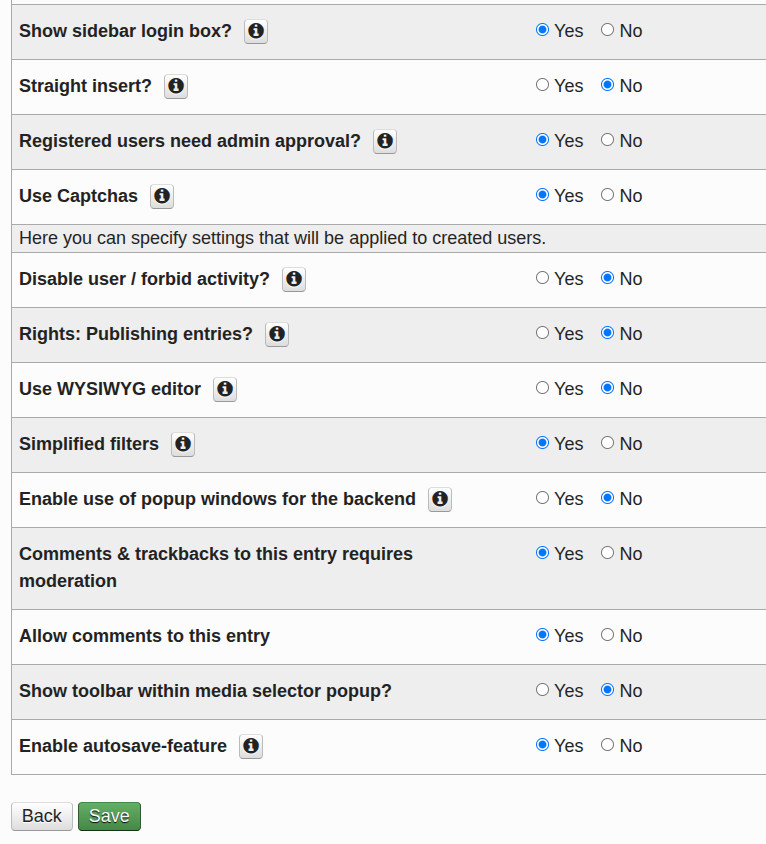
In the plugin configuration of the sidebar plugin for adduser, there is a config option for "Use Captchas". Is that one enabled?
Re: comment notifications died
Posted: Fri May 23, 2025 10:35 pm
by DavidC
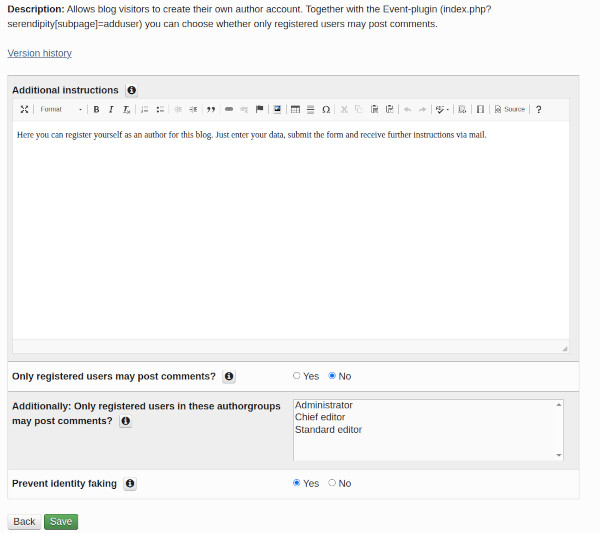
Here?
- sidebar-new-user-settings-1.jpg (52.03 KiB) Viewed 33987 times
Re: comment notifications died
Posted: Fri May 23, 2025 10:38 pm
by onli
No, that's the event plugin. In the plugin menu of the backend, there are two tabs - sidebar and event plugins. In the sidebar list there should also be a adduser plugin, and that one has the config option.
Re: comment notifications died
Posted: Fri May 23, 2025 10:41 pm
by DavidC
Yes.
- sidebar-new-user-settings-2.jpg (127.2 KiB) Viewed 33984 times
Re: comment notifications died
Posted: Fri May 23, 2025 10:42 pm
by onli
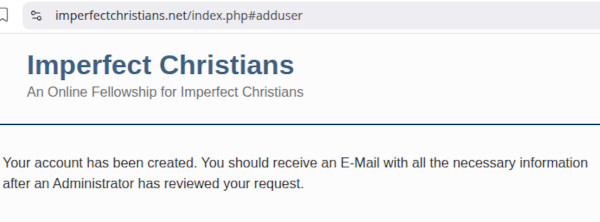
Well, that's something at least. Please set it to no and try again :)
Re: comment notifications died
Posted: Fri May 23, 2025 10:46 pm
by DavidC
Well ...
- new-user-captcha-off-1.jpg (28.81 KiB) Viewed 33983 times
Re: comment notifications died
Posted: Fri May 23, 2025 10:48 pm
by DavidC
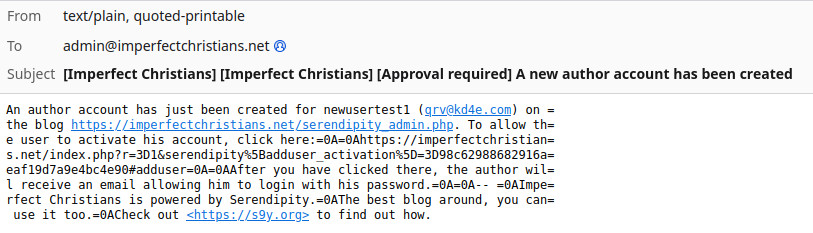
I received this at
admin@imperfectchristians.net
- new-user-captcha-off-confirm-email1.jpg (91.5 KiB) Viewed 33982 times