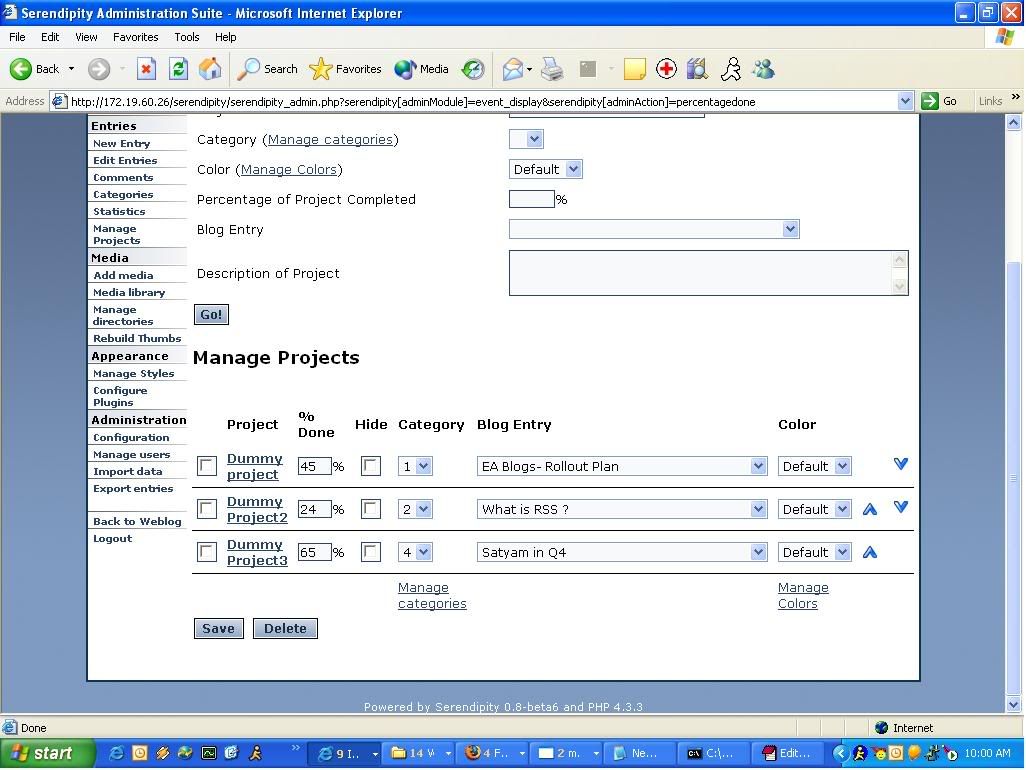
ToDo/Project List

Creating and modifying plugins.
Operator

Next problem

Post by Operator »

Sorry for the double post, but I can't edit my previous post. (I guess I should register :wink:)

Next problem: Got same errors as Rahul above, but only when using the SAVE button, not when using ADD. Though, I can't ADD any category, it doesn't show any error, it just doesn't work.
Do I have to change something so the projects are displayed in the Sidebar? (since they don't show up there)

At the moment, I can't try any Apache1 installation as Garvin suggested. Any other way to get around those errors?

Any help appreciated :D


Greetings


Operator
cottonwood
Regular
Posts: 20
Joined: Mon Apr 25, 2005 6:05 pm

Re: Next problem

Post by cottonwood »

Operator wrote: Next problem: Got same errors as Rahul above, but only when using the SAVE button, not when using ADD. Though, I can't ADD any category, it doesn't show any error, it just doesn't work.
Did the serendipity_percentagedone, serendipity_project_category, and possibly the serendipity_project_colors tables get created in your database? The serendity_ prefix might be different if you changed it in your configuration.

Do I have to change something so the projects are displayed in the Sidebar? (since they don't show up there)
You'll need to install an Event Output Wrapper sidebar plugin and configure it to show the output of the todolist event.
rahul

PROJECT / TO DO LIST

Post by rahul »

As i was not able to upload the images at the site specified by you, i uploaded the images at a free image hosting server. The links are:

http://img.photobucket.com/albums/v670/ ... roject.jpg
http://img.photobucket.com/albums/v670/ ... tegory.jpg

Yes i'm using Apache 2 with windows and am using some other open source tools also that require Apache 2.

Also, categories are not being added.
When i installed the earlier version, categories are being added in that. Still, error on pressing save button occurs. As for now, i removed the save button also.
In in the latest version, even categories are not being added.... :(
When i enter a category and press Add... Nothing happens. Same screen is displayed again.

Please check the issue and suggest me the changes.

I replaced $_POST['serendipity'] with $serendipity['POST'] in all occurences. But still, the result is same.

Thanks a Lot,
Regards,
Rahul
cottonwood
Regular
Posts: 20
Joined: Mon Apr 25, 2005 6:05 pm

Re: PROJECT / TO DO LIST

Post by cottonwood »

rahul wrote: In in the latest version, even categories are not being added.... :(
When i enter a category and press Add... Nothing happens. Same screen is displayed again.
Can you confirm that you have the following tables in your database:

serendipity_percentagedone
serendipity_project_category
serendipity_project_colors

The serendipity_project_category table should have the following fields: categoryid, category_name, parentid, colorid.

At one point, this plugin was deleting tables when the plugin was removed, and I'm wondering if one or more of the tables did not get recreated for some reason.
rahul

PROJECT / TO DO LIST

Post by rahul »

ColorId is not present. Only the rest three columns are present.
Please gimme the latest script of the tables.
Or tell me where to find it.....
Regards,
Rahul
cottonwood
Regular
Posts: 20
Joined: Mon Apr 25, 2005 6:05 pm

Re: PROJECT / TO DO LIST

Post by cottonwood »

rahul wrote:ColorId is not present. Only the rest three columns are present.
Please gimme the latest script of the tables.
Or tell me where to find it.....
Regards,
Rahul
Well that could certainly do it. I've fixed this bug in the project_category table creation code and committed to CVS. Could you try just adding a column "colorid int(11) default 0" to the serendipity_project_category table?

Code: Select all

ALTER TABLE serendipity_project_category ADD COLUMN color int(11) default 0
should do it.
rahul

PROJECT / TO DO LIST

Post by rahul »

I added the column in the table as a result, the categories are being added now. :P
Thanks a lot.... i can see the progress !!!!! Great Work !!

But still, whenever i press Save, it generates a series of errors that i mentioned earlier. Please suggest me what can be the root cause of those errors.
cottonwood
Regular
Posts: 20
Joined: Mon Apr 25, 2005 6:05 pm

Re: PROJECT / TO DO LIST

Post by cottonwood »

rahul wrote:I added the column in the table as a result, the categories are being added now. :P
Thanks a lot.... i can see the progress !!!!! Great Work !!

But still, whenever i press Save, it generates a series of errors that i mentioned earlier. Please suggest me what can be the root cause of those errors.
Glad we got one problem resolved. Do you know what version of the todolist plugin you are using? Also, what Garvin was asking for before was a copy of the HTML source of the page, rather than a picture of the page, where you see the "SAVE" button. Can you save a copy of that HTML source somewhere where I can see it?
rahul

PROJECT / TO DO LIST

Post by rahul »

Thanks Dear.

The categories are being added up now. Thanks for that great piece of help.

Now, only the Save button issue is remaining. That throws a series of errors.

Also, there's one more thing. When i use Event Sidebar Plugin, it displays the project but does not displays any image or something that is supposed to.
Plz check the exact screenshot for clarifications. The Project Tracker is on the RHS bottom.

http://img.photobucket.com/albums/v670/ ... tTrack.jpg

Please suggest the changes for Save button errors as well as this one.

Thanks a LOT,

regards,

Rahul
rahul

PROJECT / TO DO LIST

Post by rahul »

These are the 2 links of HTML codes of Add Projects and Add Categories pages respectively.....

http://nopaste.php-q.net/131377
http://nopaste.php-q.net/131378

Please check them and let me know where i can locate the error.

Thanks a Lot.

Regards,
Rahul
rahul

PROJECT / TO DO LIST

Post by rahul »

Revision 1.8 - (view) (download) (annotate) - [select for diffs]
Mon May 2 20:42:10 2005 UTC (8 hours, 59 minutes ago) by tonnesen
Branch: MAIN
CVS Tags: HEAD
Changes since 1.7: +48 -17 lines
Diff to previous 1.7

This is what i downloaded from the soruceforge.net

http://cvs.sourceforge.net/viewcvs.py/p ... 8&view=log
cottonwood
Regular
Posts: 20
Joined: Mon Apr 25, 2005 6:05 pm

Re: PROJECT / TO DO LIST

Post by cottonwood »

rahul wrote: Also, there's one more thing. When i use Event Sidebar Plugin, it displays the project but does not displays any image or something that is supposed to.
Is your blog accessible by me somewhere? Barring that, what do you see when you browse to:

http://172.19.60.26/serendipitydemo/ind ... ble.ttf_0_

If you don't see an image or a meaningful error message, try changing the following on line 561:

Code: Select all

if ($use_gd) {
    header('Content-Type: image/png');
to

Code: Select all

if ($use_gd) {
    header('Content-Type: text/plain');
and reloading the above URL and see what is displayed.
Guest

Re: PROJECT / TO DO LIST

Post by Guest »

cottonwood wrote:
rahul wrote:ColorId is not present. Only the rest three columns are present.
Please gimme the latest script of the tables.
Or tell me where to find it.....
Regards,
Rahul
Well that could certainly do it. I've fixed this bug in the project_category table creation code and committed to CVS. Could you try just adding a column "colorid int(11) default 0" to the serendipity_project_category table?

Code: Select all

ALTER TABLE serendipity_project_category ADD COLUMN color int(11) default 0
should do it.
Yep, that fixed the category problem :D Thx!
Still got the same problem as rahul, page doesn't load the color bars. (The URL you provided doesn't work either, Apache doesn't return a page)
Also tried to change the line but problem remains. (After trying to open the URL, my webserver needs a restart :shock: )
At the moment it isn't available online, but I'llt ry to put it online for tomorrow if you want.


Greetings


Operator
cottonwood
Regular
Posts: 20
Joined: Mon Apr 25, 2005 6:05 pm

Re: PROJECT / TO DO LIST

Post by cottonwood »

rahul wrote:But still, whenever i press Save, it generates a series of errors that i mentioned earlier. Please suggest me what can be the root cause of those errors.

Around line 374, please add the print_r($_POST); statement:

Code: Select all

if (isset($_POST['SAVE'])) {

    print_r($_POST);

    foreach ($_POST['serendipity']['project_to_recat'] AS $key => $row) {
        $this->update_cat($key,$row);
    }
Then click on the "SAVE" button in either the project or category edit page. You should get some output that looks like:
Array ( [serendipity] => Array ( [project_to_repercent] => Array ( [2] => 100 [3] => 70 [5] => 98 [6] => 30 [8] => 99 [1] => 90 [7] => 20 [4] => 60 [10] => 10 [13] => 32 [14] => 16 [12] => 75 [11] => 14 [15] => 50 [16] => 50 ) [project_to_recat] => Array ( [2] => 3 [3] => 3 [5] => 3 [6] => 4 [8] => 4 [1] => 5 [7] => 5 [4] => 6 [10] => 6 [13] => 8 [14] => 8 [12] => 10 [11] => 10 [15] => 11 [16] => 11 ) [project_to_reassign] => Array ( [2] => 0 [3] => 15 [5] => 0 [6] => 0 [8] => 13 [1] => 0 [7] => 0 [4] => 0 [10] => 0 [13] => 0 [14] => 0 [12] => 0 [11] => 0 [15] => 0 [16] => 0 ) [project_to_recolor] => Array ( [2] => 0 [3] => 0 [5] => 0 [6] => 0 [8] => 0 [1] => 0 [7] => 0 [4] => 0 [10] => 0 [13] => 0 [14] => 0 [12] => 0 [11] => 0 [15] => 0 [16] => 0 ) ) [SAVE] => Save )
Post that string here.
cottonwood
Regular
Posts: 20
Joined: Mon Apr 25, 2005 6:05 pm

Re: PROJECT / TO DO LIST

Post by cottonwood »

Anonymous wrote: Yep, that fixed the category problem :D Thx!
Still got the same problem as rahul, page doesn't load the color bars. (The URL you provided doesn't work either, Apache doesn't return a page)
Also tried to change the line but problem remains. (After trying to open the URL, my webserver needs a restart :shock: )
Your web server needs a restart, or your browser? Can you edit projects and categories using the SAVE button, or are you still getting those errors as well as the problem with no bars?

Let's try switching to the static bars for now, just as a test. Around line 332, change:

Code: Select all

if (function_exists('imagettftext') && function_exists('imagepng')) {
to

Code: Select all

if (function_exists('imagettftext') && function_exists('imagepng') && 0) {
This will force the todolist plugin to use the static graphics instead of generating them on the fly.

I just found another bug in testing this, so please make sure that your percentages are rounded to the nearest 5% mark (ie 75%, 80%, 85%, but not 83%) for this test.
Post Reply