Codebox

Random stuff about serendipity. Discussion, Questions, Paraphernalia.
Post Reply
thedave
Regular
Posts: 14
Joined: Tue Jan 16, 2007 4:06 pm

Codebox

Post by thedave »

Hi Forum.

For a technological blog it is very important to have some decent codeboxes to display some sourcecode. So what are my options here? I certainly dont want to write the tables and divs by myself every time.

My first attempt was to find a nice plugin, which does this for me. I found GeSHi, text_wiki and BBCode. I knew BBCode from the forums, so I gave it a shot. My first impression was good. A nice looking codebox. But not exactly what I was looking for. How could I change the title, the styles and how could I enable it to show linenumbers?

Having no idea how the serendipity plugin systems works, I took a look at serendipity_event_bbcode.php... so far so good. I realized that it only really interprets the "code" thing, and I cannot pass any parameters for my title or something. In addition the styles were hardcoded in this file. WTF? This is not the way I want to go.

My next try was text_wiki. I couldn't even find a proper "codebox" style and for GeSHi i couldn't find any docs (maybe I was a little impatient there).

Ok then. Maybe there is no plugin which enables my to have a decent codebox-environment. I have to make a compromise then. I remembered that the FCKEditor maybe is capable of this. I installed the FCKEditor plugin and quickly realised that it's not. ;) But with a quick tweak you can enable snippets:

- Install the FCKEditor plugin and the latest release of the FCKEditor
- Open the fcktemplates.xml and create a new template for your codebox. Like this:

Code: Select all

<Template title="Codebox" image="template1.gif">
  <Description>Codebox snipped</Description> 
- <Html>
- <![CDATA[ 
				<div class="codetop">CODE</div>
				<div class="codemain">

				</div>
			

  ]]> 
  </Html>
  </Template>
- Edit fckconfig.js and change these:

Code: Select all

FCKConfig.TemplateReplaceAll = false;
FCKConfig.TemplateReplaceCheckbox = true;
Now, change the styles for your code box. You need the edit the styles.css from your current style, the fck_editor.css and the fck_editorarea.css. It may look like this:

Code: Select all

.codetop,
{
	background: #FDDBCC;
	color: #000;
	font-weight: bold;
	margin: 0 auto 0 auto;
	padding: 3px;
}

.codemain,
{
	background: #FAFCFE;
	border: 1px dotted #000;
	color: #465584;
	font-family: Courier, "Courier New", Verdana, Arial;
	margin: 0 auto 0 auto;
	padding: 2px;
}
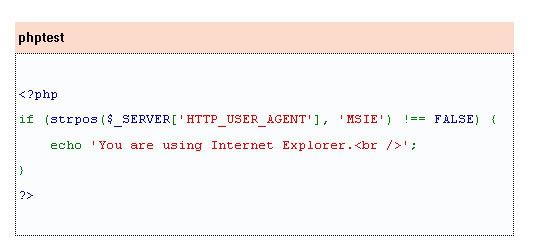
Then you have a snippet for a very simple codebox in you FCKEditor.

Image

You will notice, that the syntax is colored. Thats only because I copied this from a html page.

This is as near as I could get. I would like to use this thread to collect some alternatives. Maybe I missed something, perhaps there is a plugin out there, which has excatly the features which I need, which are very few:

- Styles should be customizable
- The title should not be fixed
- Line numbers are optional shown
- Syntax coloring would be nice

If there is a plugin, please notify me. :)

Cheers,
thedave
garvinhicking
Core Developer
Posts: 30022
Joined: Tue Sep 16, 2003 9:45 pm
Location: Cologne, Germany
Contact:

Re: Codebox

Post by garvinhicking »

Hi!

You should really have a look at Geshi! It can do everything from line numbering to syntax highlighting and is the best fit for your task. :-)

HTH,
Garvin
# Garvin Hicking (s9y Developer)
# Did I help you? Consider making me happy: http://wishes.garv.in/
# or use my PayPal account "paypal {at} supergarv (dot) de"
# My "other" hobby: http://flickr.garv.in/
thedave
Regular
Posts: 14
Joined: Tue Jan 16, 2007 4:06 pm

Post by thedave »

Hi Garvin,

thx for your reply. Is there a documentation for the geshi plugin where I can see all parameters?

Can't find it.

Thx!
Dave


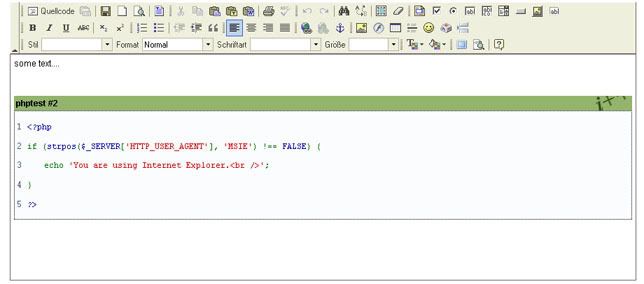
Btw, the FCK snippet looks like this.


Image
garvinhicking
Core Developer
Posts: 30022
Joined: Tue Sep 16, 2003 9:45 pm
Location: Cologne, Germany
Contact:

Post by garvinhicking »

Hi!
thx for your reply. Is there a documentation for the geshi plugin where I can see all parameters?
Yes. First hit when googling for "Geshi":

http://qbnz.com/highlighter/

dsp.highlighter is nice, but because it's pure javascript it won't work in RSS feeds and has dependencies on the browser; geshi does it with pure CSS which I personally prefer...

Regards,
Garvin
# Garvin Hicking (s9y Developer)
# Did I help you? Consider making me happy: http://wishes.garv.in/
# or use my PayPal account "paypal {at} supergarv (dot) de"
# My "other" hobby: http://flickr.garv.in/
thedave
Regular
Posts: 14
Joined: Tue Jan 16, 2007 4:06 pm

Post by thedave »

Hi!

Thanks Garvin. Actually I was looking for the plugin parameters, not the parameters for the highlighter itself. But a quick look in the geshi.php says that "lang" and "ln" are the only parameters.

Anyhoo... I managed to get both highlighters running. But I didn't like the way the dp.SyntaxHighlighter worked. I can always see the textarea at rendertime gets replaced with the divs... really?

So I took Geshi. I modified my template, like this:

Code: Select all

<Template title="Codebox" image="template1.gif">
		<Description>Codebox snipped</Description>
		<Html>
			<![CDATA[				  
				<div class="codetop">CODE</div>
				<div class="codemain">[geshi lang=php ln=y] code [/geshi]</div>
			]]>
		</Html>
	</Template>
And added the following RegEx to my FCKConfig:

Code: Select all

FCKConfig.ProtectedSource.Add( /\[geshi[\s\S]*\][\s\S]*?\[\/geshi\]/gi ) ;
Now I have a fully functional button in my WYSIWYG Editor for a nice looking code area. Geshi code is protected from getting modified by the FCKEditor. The only disadvantage is, that it is also only displayed in source code mode. I'll work and that... maybe.

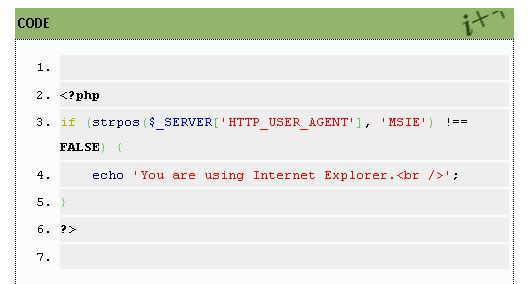
It looks like this now, which is fine for me:

Image

Another nice thing with geshi is, that i recognizes the language specific functions, which can be linked to the docs...

Thanks for your help.

Cheers,
dave
MrLeeh
Regular
Posts: 11
Joined: Sat May 03, 2008 3:55 pm

Syntaxhighlighting in FCK Editor

Post by MrLeeh »

Hey thedave,
habe da was gefunden, was dich interessieren könnte: GeShi pro von Shaun Freeman ermöglicht ein Einbinden von Geshi in den FCK Editor. Komfortable Bedienung über ein Toolbar Button. Außerdem kann man sich das Ergebnis jetzt auch im FCK Editor ansehen und muss nicht immer auf Vorschau klicken.

siehe Eintrag auf meinem Blog

Beste Grüße
MrLeeh
thedave
Regular
Posts: 14
Joined: Tue Jan 16, 2007 4:06 pm

Post by thedave »

Hey danke, dass hört sich wirklich gut an! Guter Tipp, ich werds mal ausprobieren.
Post Reply